

Customer Relationship Management (CRM) systems are invaluable tools for managing client data, sales, and marketing activities. One of the most powerful features of a CRM is its ability to generate detailed reports that help teams track their performance, measure progress, and identify areas for improvement. Whether you’re in marketing, sales, or post-sales, the right CRM reports can provide insights that drive smarter decision-making, optimize workflows, and improve customer satisfaction.
Problems with Traditional CRM Reporting
Data reporting has historically been considered a necessary evil. Indeed, leaders would be left without any kind of basis upon which to make judgments if they were unable to articulate and summarize the knowledge they have learned. Nevertheless, producing reports from unprocessed data can be an extremely time-consuming and ineffective process. In addition to raising expenses, the time and effort required to produce these reports had the potential to take up skilled workers' time and skills that could have been better used elsewhere. Hiring outside experts, of course, came with additional challenges, restricting the organization's independence and taking money away from other crucial areas. After the reports were finalized, things rarely improved because the final products were frequently almost as complicated.
In this blog, we’ll explore the types of CRM reports that can benefit marketing, sales, and post-sales teams and why they are important in each department.
CRM Reports for Marketing Teams
Marketing teams rely heavily on data to assess the success of their campaigns and understand customer behavior. With a CRM, marketers can generate a variety of reports that help them fine-tune their strategies and focus on the areas that matter most.
1. Campaign Performance Reports
Campaign performance reports give marketers a clear picture of how well their marketing efforts are working. These reports track key metrics like open rates, click-through rates, conversions, and overall ROI.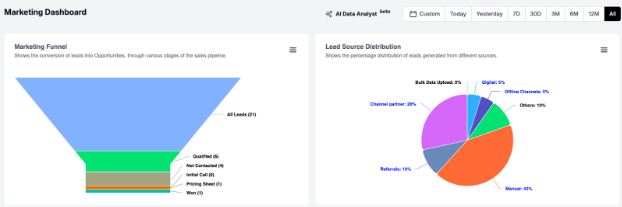
-
Why they matter:
-
Measure campaign effectiveness: marketers can see which campaigns are driving the most engagement and conversions, allowing them to allocate resources more effectively.
-
Identify Customer Interests: By examining which messages or content perform the best, marketing teams can better understand customer interests and preferences.
-
Optimize Future Campaigns: Insights from past campaigns can guide the development of future strategies, helping marketing teams craft more targeted and relevant campaigns.
-
In real estate CRM, PropFlo provides the CRM reports with actual budgets vs. marketing spends with all details like cost per lead, cost per qualified lead, and many more metrics that are not there in many CRM softwares. With Propflo Marketing Automation CRM, you can save time and increase ROI with the proper CRM reports.
2. Lead Generation and Qualification Reports
These reports provide insights into the number of leads generated, the source of those leads (e.g., email, social media, paid ads), and their status in the sales funnel. It also includes lead scoring data that helps the team assess how likely a lead is to convert.
-
Why they matter:
-
Assess Lead Quality: These reports help marketing teams understand which channels are bringing in high-quality leads, which are more likely to convert into customers.
-
Guide Lead Nurturing: By tracking where leads are in the funnel, marketers can adjust their nurturing strategies to move leads closer to conversion.
-
Resource Allocation: Identifying which lead sources are the most effective allows marketing teams to allocate resources to the most successful channels.
3. Customer Segmentation Reports
These reports break down customers based on various attributes such as demographics, purchase history, or engagement with previous campaigns. This helps marketers target specific segments with tailored messaging and offers.
-
Why they matter:
-
Personalized Marketing: Understanding customer segments allows marketing teams to deliver highly relevant and personalized content, improving engagement and conversion rates.
-
Identify Trends: Segmentation reports provide insights into emerging trends or shifts in customer behavior, enabling marketing teams to stay ahead of the curve.
-
Improve Retargeting: By analyzing past customers or engaged prospects, marketing teams can create more effective retargeting campaigns that drive higher conversions.
CRM Reports for Sales Teams
Sales teams use CRM reports to track progress, forecast sales, and gain insights into team performance. These reports help sales reps understand their targets, monitor customer interactions, and adjust their approach based on data.
1. Sales Pipeline and Forecasting Reports
Sales pipeline reports show the number of deals in the pipeline, their value, and the stage they are in. Forecasting reports take historical data and trends to predict future sales performance, providing a roadmap for upcoming periods.
-
Why they matter:
-
Track Sales Progress: These reports give sales teams a clear view of where each deal stands in the sales cycle, helping them prioritize their efforts.
-
Predict Revenue: Forecasting reports help sales teams predict revenue for upcoming months, which is essential for planning and setting realistic targets.
-
Identify Bottlenecks: If there are deals stuck at a particular stage, sales managers can identify issues and take action to move them forward.
2. Sales Activity Reports
Sales activity reports track the number of calls, meetings, emails, and other sales-related activities performed by each salesperson. These reports give managers a clear view of each rep’s daily efforts and overall productivity.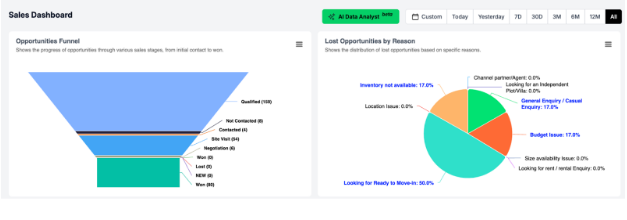
-
Why they matter:
-
Monitor Individual Performance: Managers can use these reports to identify which sales reps are consistently hitting their targets and which may need additional training or support.
-
Ensure Accountability: Tracking activity levels helps ensure that sales reps are staying on top of their leads and following up as needed.
-
Identify Training Needs: If certain activities are consistently lower than expected (e.g., a rep is making fewer calls or sending fewer emails), managers can address potential skill gaps or challenges.
3. Win/Loss Analysis Reports
A win/loss analysis report helps sales teams understand why deals are won or lost. These reports provide data on factors like customer objections, competitor activity, pricing issues, and other relevant details.
-
Why they matter:
-
Learn from Wins and Losses: Analyzing what went well and what didn’t in closed deals helps sales teams refine their strategies and improve their win rates.
-
Identify Obstacles: These reports reveal recurring challenges or objections from prospects, which can be addressed in future sales efforts.
-
Improve Sales Training: Sales managers can use win/loss data to identify specific areas where reps need additional training or resources, such as handling objections or competitive positioning.
CRM Reports for Post-Sales Teams
Once a sale is completed, the post-sales team takes over to ensure customer satisfaction, retention, and successful implementation of the product or service. CRM reports for post-sales teams focus on customer success, service, and engagement.
1. Customer Satisfaction and Feedback Reports
These reports gather customer satisfaction data from surveys, reviews, and support tickets. By analyzing this feedback, post-sales teams can identify areas where the company is excelling and areas that need improvement.
-
Why they matter:
-
Track Customer Happiness: Post-sales teams need to know how customers feel about the product and service to ensure they are satisfied and loyal.
-
Spot Potential Issues Early: By reviewing feedback, teams can identify emerging problems before they escalate, improving retention.
-
Guide Process Improvement: Negative feedback can highlight gaps in the customer experience, helping the team make necessary adjustments.
2. Customer Retention and Churn Reports
Retention and churn reports track the number of customers who renew their contracts, continue using the service, or, conversely, leave the company. These reports provide insights into customer loyalty and long-term satisfaction.
-
Why they matter:
-
Measure Retention Efforts: These reports help post-sales teams understand how well they are retaining customers and where they can improve to reduce churn.
-
Identify At-Risk Customers: By tracking patterns in churn, post-sales teams can identify customers who are at risk and intervene before they leave.
-
Improve Customer Engagement: With retention data, teams can focus on strategies that foster customer loyalty, such as personalized engagement and proactive customer support.
3. Support ticket report of resolution
Such reports track support tickets generated, issues reported, time for resolution, and customer satisfaction about the resolution. They can help post-sales teams understand the quality of customer support.
-
Why they matter:
-
Measure Support Effectiveness: By making post-sales teams measure the effectiveness in solving the problems faced by the customers and complaints of such nature.
-
Common problem identification. Common support requests that happen over time help the post-sales team identify issues in the product or service.
-
Ensure Timely Resolution: Monitoring resolution time ensures that customers' concerns are being addressed promptly, improving overall satisfaction.
Conclusion
CRM reports are invaluable tools for marketing, sales, and post-sales teams. All teams need data-driven insights to improve performance, meet customer expectations, and attain the long-term success of the business. Marketing teams use the CRM reports to measure the effectiveness of their campaigns, and a salesperson always tracks progress and has some idea about revenue forecast. The post-sales teams would be focused on customer satisfaction, retention, and support.
Through these reports, teams can take the right steps in making better decisions and refining their strategies to ensure they deliver the best experience to their customers. For such in-depth reports in real estate, PropFlo is the go-to CRM software to get the in-depth reports for all teams like marketing, sales, post sales and even payment and transaction tracking reports.