

Upgrading your CRM can improve your sales performance, improve customer relationships, and refine your workflows. But it can also be a hazardous process that requires migrating, updating, and consolidating vast amounts of data. How can you prevent losing or corrupting your precious information during a CRM upgrade? Here are some tips to assist you in planning and implementing a smooth transition.
1. Evaluating your present CRM
Before you go ahead and upgrade your CRM, you must analyze your existing system and determine its strengths, weaknesses, and shortcomings. What are the features that you most heavily use? What are the pain points and challenges confronting you? What are the requirements and goals of your salesforce and your buyers? How does your CRM play along with your other tools and platforms? Performing a detailed review of your existing CRM will assist you in deciding what you require from your new system and what information you need to transfer.
2. Select an appropriate CRM
After you have an understanding of what your existing CRM looks like, you can begin searching for a new system that will suit your needs and expectations. There are numerous CRM solutions out there in the market, and they all have their features, advantages, and disadvantages. You must weigh and contrast various CRM solutions and look at the functionality, scalability, security, price, and support. You also want to verify how simple or complicated it will be to migrate data from your existing CRM to the new CRM. Ideally, you would want a CRM with a built-in migration function or a trusted third-party tool to assist in CRM data migration.
3. Backup your data
Before you begin the migration process, you must backup your data and place it in a safe and convenient location. This is an important step that can prevent you from losing or damaging your data in the event something happens to it during the upgrade. You must backup both your source and destination data and ensure they are complete and accurate. You must also backup any customizations, configurations, and integrations that you have done to your CRM. You may store your data using cloud storage, external hard drives, or other backup solutions.
4. Sanitize your data
Another crucial step prior to migrating your data is cleaning it and eliminating any errors, duplicates, or inconsistencies. Quality data is vital in guaranteeing that your new CRM functions efficiently and provides accurate and consistent results. You should go through your data and verify for any missing, old, or useless information. You also need to standardize your data formats, fields, and values to meet the needs of your new CRM. You can utilize data cleansing software or services to assist you in doing this.
5. Move your data
Once you have backed up and cleaned your data, you can now migrate it to your new CRM. Depending on the CRM solution that you're using, you might have varying options for how to do this. Some CRMs have an auto-migration tool that can switch over your data with a few clicks. Some might ask you to employ a manual or semi-manual approach that requires you to export, import, or map your data. Whichever approach you employ, you must be careful to follow the guidelines and test the migration first before you commit yourself to it. You also need to track the migration process and watch out for any errors or problems that may occur.
6. Check your data
The last thing to do after you have moved your data is to verify it and ensure that it is correct, complete, and consistent in your new CRM. You should compare your source and target data and ensure that they are equal and that nothing is lost or altered. You should also ensure that your data is synchronized with your business processes, rules, and workflows. You ought to also test the performance and functionality of your new CRM to see if it can serve you as expected and needed. You may employ data validation tools or services to assist you with this task.
What are the common challenges that occur during CRM migration?
1. Data loss due to mismatched fields or corrupted files
If your old crm dont align correctly with the new crm (for example phone numbers trying to fetch into an email field) there are high chances of data loss. This can also happen when files are exported or imported using incompatible formats
2. Extended downtime affecting sales productivity
Migrating CRM takes time; it should be properly planned, if not your sales and support teams might not be able to access the database, send quotes, initiate conversations or followups on existing leads, which will lead to business loss.
3. Integration issues with existing platforms
If the new CRM doesn't connect smoothly with other tools like social media portals, data analytics tools, AI integrations then data mismatch can make reporting harder.
4. Inconsistent data by improper mapping
During the data migration data fields nomenclature should be mapped correctly between new and old crm. Inaccurate mapping can create duplicate or misplaced information.
Post CRM Migration Optimization
Once the CRM is live work doesn't stop here, it's just beginning to get the best results.
1. Build Custom Dashboards and Report
You need to create the custom dashboards for sales, marketing, post sales and customer success team with appropriate metrics and do the regular checks on metrics flow within crm.
2. Automate Routine Task and Data entry
Leverage the workflow automation and save time, create lead and deals pipeline, automate lead assignments, followups, task, status update and lead nurturing via marketing automation . This will save a lot of time for your team and they can dedicate more time on closing and negotiating the deals.
3. Regularly review and Clean your Database
Even after migration and complete setup, crm data quality needs ongoing attention, creating a process to review the de-duplicates and clean data.
4. AI Features Adoption
Every CRM is doing continuous improvement in their product and adding the new feature, you should be ready and trained to adopt and integrate those features in the existing CRM without disturbing the workflows.
Also Read: 4 Major Challenges for CRM Implementation
How to Choose a Right CRM for Partner for a Real Estate business
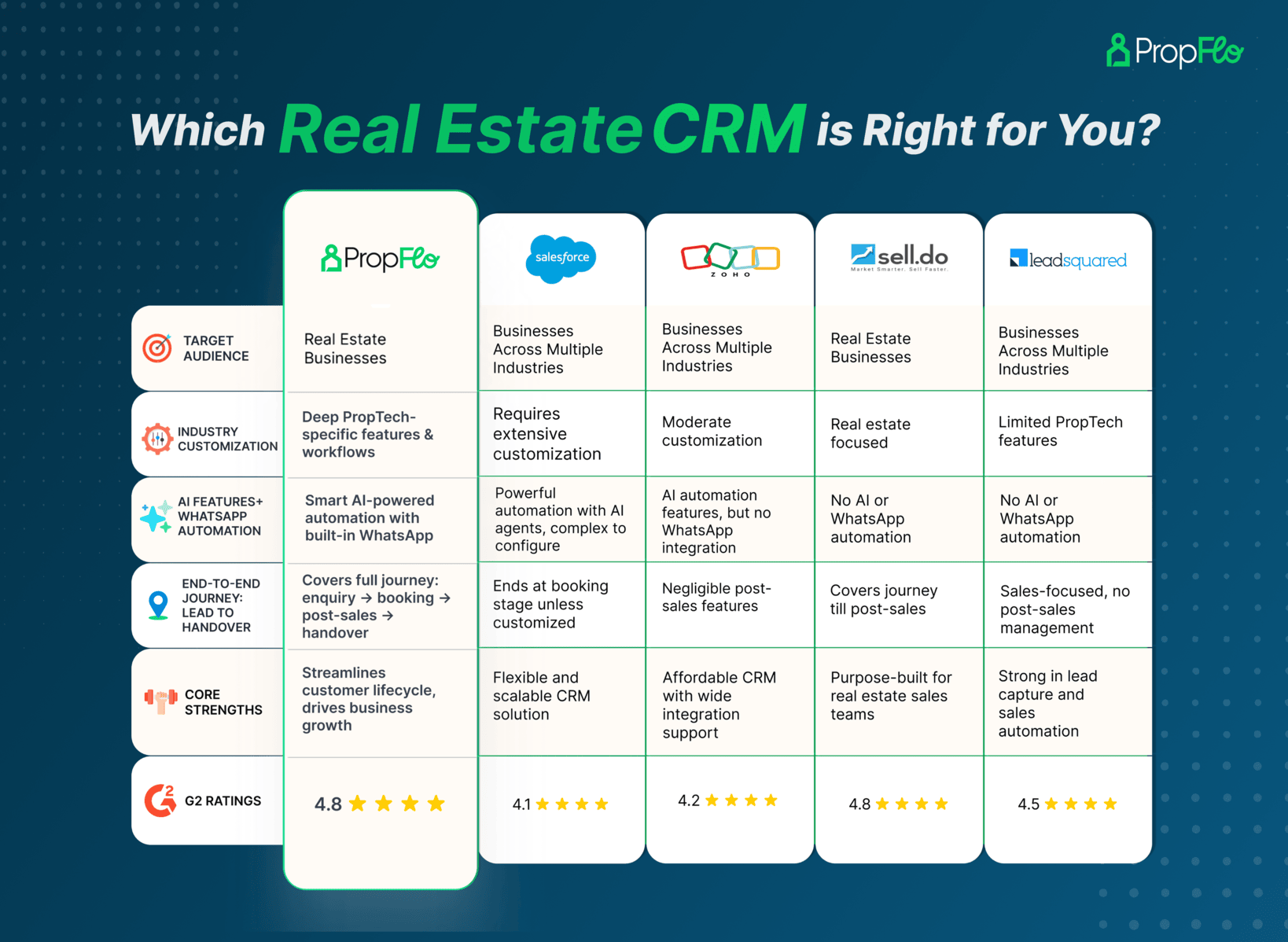
Any business wants the smooth working CRM Software to manage the daily operations without much difficulties and It should be easy to use and affordable. But eventually they turned up getting the solution which has no industry specific features and you get automated customer support replies and nobody is there for instant help even after paying full amount. To choose the CRM is a wise decision and many stakeholders are involved. To summarize this before choosing a crm software please go through the product website, product strength, feature sheets, Demonstration, walkthrough videos, online reviews and then take the further decision. There are many real estate software products available in the market with better quality and customer support rather than bigger and well established companies which are not ready for customizations, scalable and supportive.